
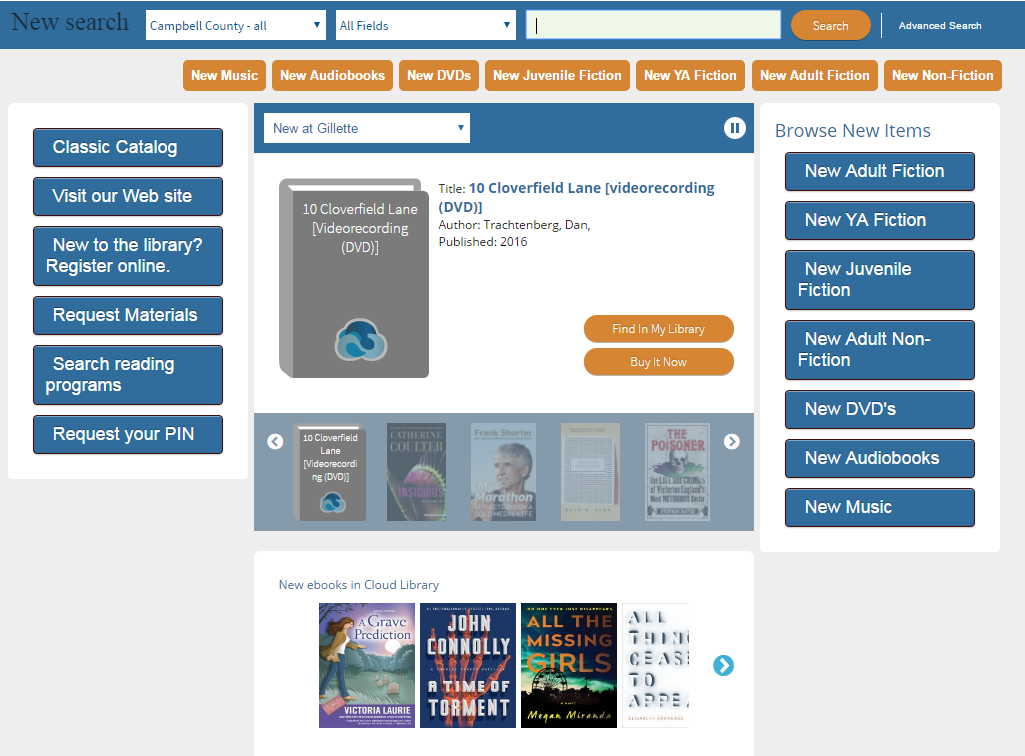
 The featured shelves in 3M Cloud Library are a quick way to find a great read. Now, your WYLD library can embed a featured shelf on your main search page.
To show a featured shelf on any web page, go to the Cloud Library web app and select ‘list view’ for any shelf.
- Copy the URL in the address bar of the browser
- Change the word ‘Featured’ in the URL to ‘EmbeddableTray’
- Create an iFrame on any web page using the edited URL as the target
Example – New this month
This code will display the new books featured shelf below:
<iframe src=”https://ebook.yourcloudlibrary.com/library/wyominglibraries/EmbeddableTray/a44917189bfc42bd936adb0e49c57bca” width=”90%” height=”150″ style=”border:none;”> </iframe>
The Cloud Library will be rebranded in coming weeks as a Bibliotheca product, instead of 3M. We’ll have more information on the blog soon. In the meantime, you can download the new marketing kit.